

Android application development has come a long way with all the new technologies, languages and platforms being updated every now and then. You have yourself experienced regular updates in the applications in your android phones, how they have changed overtime, from the interface to user experience and many other features. Initially, only java was used to Create Android applications, now Kotlin, an open source and easy to use language has also become an option for the developers.
Java for android development
Java is being used by the android application developers since inception as it is the only language used for the same. Those who are familiar with the language know in and out of it. For those who are new to it, Java is an object oriented programming language that was launched in 1995. It is mostly used for standalone and backend development. Android is also written in Java, therefore, it is the first choice of the developers for creating android applications.
Kotlin: More stable and congruous
Kotlin programming language gained its name from the Kotlin Island near St. Petersburg. Though, Kotlin appeared in 2011, its v1.0 was officially launched in 2016 and is being updated since then. It is a concise, cross platform development programming language. Although, it has been designed to interoperate with Java, Kotlin is used as a complete new alternative by the application developers.
In Kotlin V1.2 the feature of sharing code between JVM and javaScript was added. Then came V1.3 with coroutines for asynchronous programming. In 2017, Google announced that Kotlin could be a preferred language for android application development.
Kotlin compared to java:
Both the languages are useful in their own way. Some features and coding changes in Kotlin have made it even more popular among the developers.
Have a look at the two codes below:
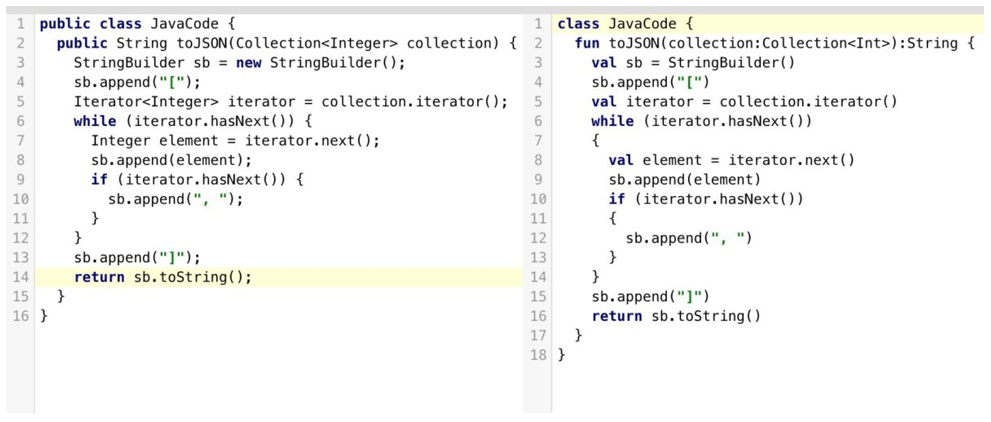
Those familiar with both these languages will know what the difference is. To make it clear, the code on the left is in Java and the other one is a bit tweaked in Kotlin. Kotlin is more streamlined and concise as compared to Java. You can see in the code on the right, functions are defined with the fun keyword, and semicolons are optional at the end. The val keyword declares a read-only property or local variable in Kotlin. These are a few changes, there are many more differences and special features that make Kotlin a much user friendly language.
Let’s go through the features one by one.
1. NullPointerException
In Java, the user is allowed to assign null value to any variable but while accessing any object reference which has been assigned a null value, raises exception. The developer then has to handle the exception and this may lead to a lot of delay and frustration. In Kotlin, every variable and object is non nullable by default. It means the user cannot assign any null value, if tried, the program will fail while compiling. If there is any requirement then the user can assign a null value to the variable as:
val num : int ? = nul
2. Coroutines-What are these?
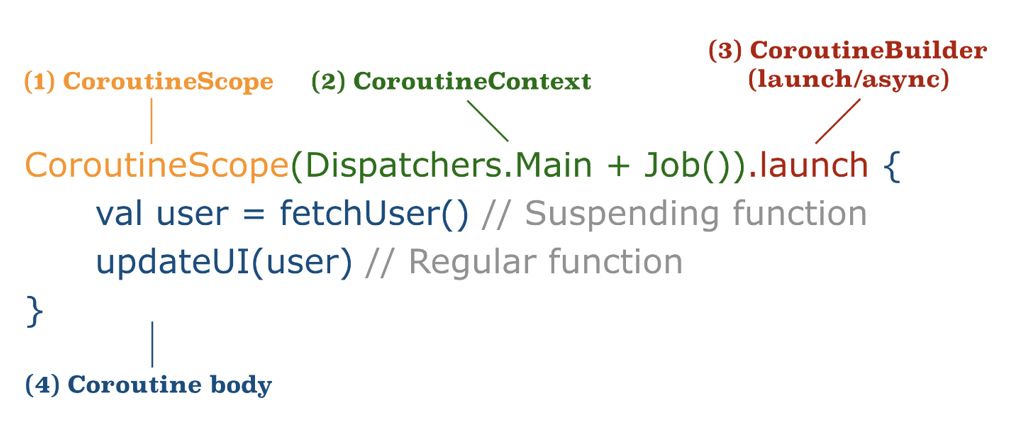
This is an example of how coroutines are written in Kotlin coding. The code clearly defines the terms of a coroutine. It is another great feature of Kotlin. The support of coroutines helps in executing long runtime operations by suspending the execution at a certain point without blocking the threads. Coroutines help in managing the task without any hassle. Android platform is single threaded by default but in case of longer runtime network I/O or CPU intensive operations, Java supports Android in creating multiple threads in the background.
But this makes the task complex and sometimes it is unmanageable.
Java’s answer to some of the same pain points is virtual threads (Project Loom), standard since Java 21 — they let you write blocking-style code that scales like async code. It’s a different model from coroutines (threads vs. suspending functions), so it’s not a direct replacement, but it’s worth knowing Java isn’t standing still here either.
3. Smart Casts
In Kotlin there are smart casts that check the type and cast of the variable automatically. is or !is operator is used to check the type of variable, and compiler automatically casts the variable to the target type. In Java the user has to first check the type and caste of the variable for any operation.
Have a look at this code using ‘is’ operator in Kotlin for clear understanding:
fun main(args: Array) {

val str1: String? = “Sentences”

var str2: String? = null // prints String is null

if(str1 is String) {

// No Explicit type Casting needed.

println(“length of String ${str1.length}”)

}

else {

println(“String is null”)

}

}
4. Extension Functions
There are no extension functions in Java. It means if the user has to extend the functionality of any function he/she will have to create a new class and inherit the parent class. Whereas, Kotlin provides the feature of extending the existing functions by prefixing the name of the class to the name of the new function. For example:
fun String.removeFirstLastChar(): String = this.substring(1, this.length – 1)

fun main(args: Array) {

val myString= “Hello Everyone”

val result = myString.removeFirstLastChar()

println(“First character is: $result”)

}
In the code above, fun String.removeFirstLastChar() is an extension function.
5. Data Classes
In Java if any class has to hold only data then we need to define constructers, variables to store data, getter() and setter() methods, hashcode(), ToString() and equals() function. In case of Kotlin if the class has to hold only data then it is defined with keyword data and the rest is taken care of by the compiler like creating constructors, getter(), setter() methods etc.
data class Person(var name: String, var surname: String, var id: String)
Since Java 16, Java has closed most of this gap with record – record Person(String name, String surname, String id) {} gives you the constructor, getters, equals(), hashCode(), and toString() in one line, similar to Kotlin’s data class. The difference now is more about defaults: Kotlin’s data classes are mutable by default with var properties and copy() support, while Java records are immutable by design.
6. Type Inference
Java has supported local variable type inference with var since Java 10 (var str = “hello” works today). The difference now is scope: Kotlin’s inference extends further, into function return types and more contexts, while Java’s var is limited to local variables – you still can’t use it for fields or method signatures.
Every variable needs to be defined with its type explicitly when you are coding in Java. In case of Kotlin there is no compulsion to define the type of the variable. If you want you can always define explicitly.
You can freely write val str = “hello” in Kotlin
instead of val str : String = “hello” as used in Java
“ Have a look at this code using ‘is’ operator in Kotlin for clear understanding:”
Java has narrowed this gap: if (obj instanceof String s) auto-casts obj to s without a separate cast, and Java 21’s pattern matching for switch extends this into switch statements. Kotlin’s smart casts still cover more scenarios automatically, but this is no longer an area where Java has nothing.
7. Functional Programming
Kotlin treats functions as first-class values and offers concise lambda syntax, higher-order functions, extension functions, and operator overloading. Java has supported lambdas, method references, and Streams API since Java 8. Whereas Kotlin treats functional style as central rather than additive.
8. Kotlin Multiplatform and Compose
By 2026 Kotlin Multiplatform (KMP) and Compose Multiplatform are stable and used in production to share business logic and UI across Android, iOS, desktop, and web from one Kotlin codebase — something with no Java equivalent.
One shift worth calling out for 2026: Kotlin Multiplatform has moved from experimental to genuinely production-ready, with the K2 compiler (stable since Kotlin 2.0) and Compose Multiplatform now shipping in real apps across Android, iOS, desktop, and web from a single codebase. This is a capability Java simply doesn’t have a path to — it’s arguably the strongest reason teams choose Kotlin for new cross-platform projects today, beyond the syntax differences covered above.
Conclusion
By 2026, this is less of an open debate and more of a division of labor: Kotlin is Google’s default for new Android UI work (Jetpack Compose is Kotlin-only, with no Java equivalent), while Java remains the backbone of backend, enterprise, and large legacy systems where its 30-year library ecosystem and hiring pool are hard to beat. The right call still depends on your existing codebase, team skills, and whether you’re building new Android UI or maintaining backend systems.